
Translation Memory & Glossaries
Scaling an application globally introduces a massive logistical challenge: keeping strings synchronized across design files, codebases, and multiple languages without degrading velocity. Translating a dynamic application isn't just a linguistic task—it's an infrastructure problem.
When evaluating a modern Translation Management System (TMS), two technical pillars dictate its effectiveness: Terminology Management (Glossary) and Translation Memory (TM). Here is a deep dive into how IntlPull leverages these features under the hood.
1. The Glossary
While general translation handles dynamic sentences, Terminology Management (the Glossary) handles strict nomenclature. Every application relies on specific terminology—whether it's industry jargon, trademarked features, or specific UI components—that must remain uniform.
Domain-Specific Terminology Management
Consider a fintech application built in Next.js. A term like "Current Account" cannot be translated loosely based on a linguist's preference; it has highly specific legal definitions in target locales (e.g., Cuenta corriente in Spanish, Girokonto in German).
Setting up a domain-specific glossary in IntlPull ensures that industry-standard terminology is isolated and rigorously managed. By establishing dedicated glossaries (like "Banking"), you create an authoritative source of truth.

Fig 1.1: Establishing the Banking Glossary context
Enforcing Constraints at the String Level
A robust Glossary tool acts as a safeguard, preventing critical errors before they are ever merged into a production branch. When defining a term, teams provide the exact target translation alongside a rigid definition to eliminate semantic ambiguity.
Exact Match & Case Sensitivity: If a feature name is a protected brand asset (e.g., "NeoSphere"), enforcing case sensitivity ensures it is never accidentally localized, lowercased, or altered.

Fig 1.2: Defining translations with constraints
Global Coverage Tracking
A high-level view of the Termbase allows teams to track terminology coverage across all supported languages at a glance.
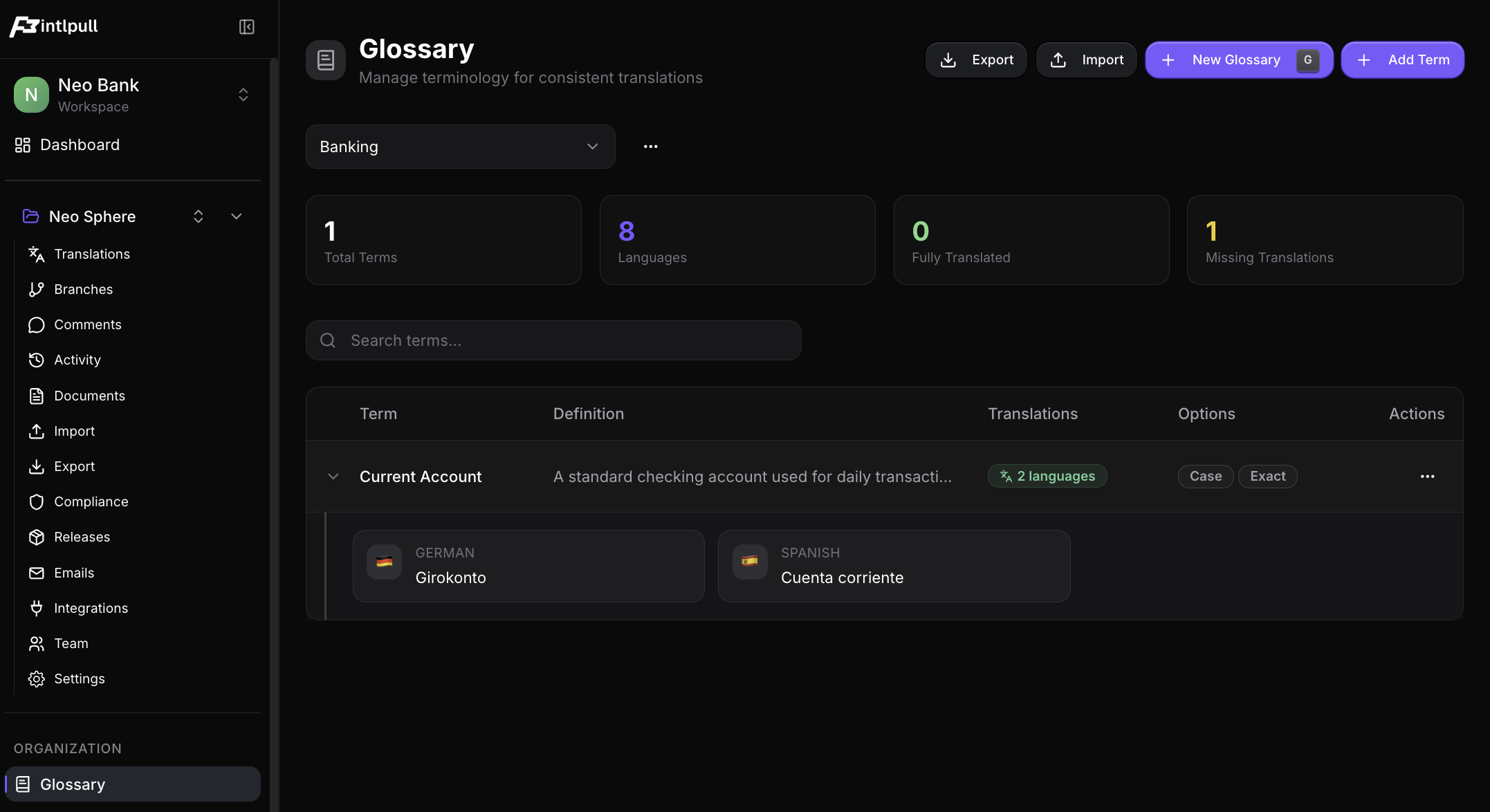
2. Translation Memory (TM)
At its core, a Translation Memory is a continually learning database that stores previously translated segments. When a new string is pushed from a design file or code repository, the TMS scans this database to find identical or mathematically similar strings, instantly suggesting a translation.
Seeding the Engine & Semantic Context
A high-functioning TM stores more than just strings; it stores context. A word like "Home" could mean a literal house, or it could be a dashboard navigation label in a React Native app.
By attaching metadata (e.g., "Security prompt for ATM or mobile app login"), the TM ensures that suggested matches are contextually accurate for the specific UI component being localized.
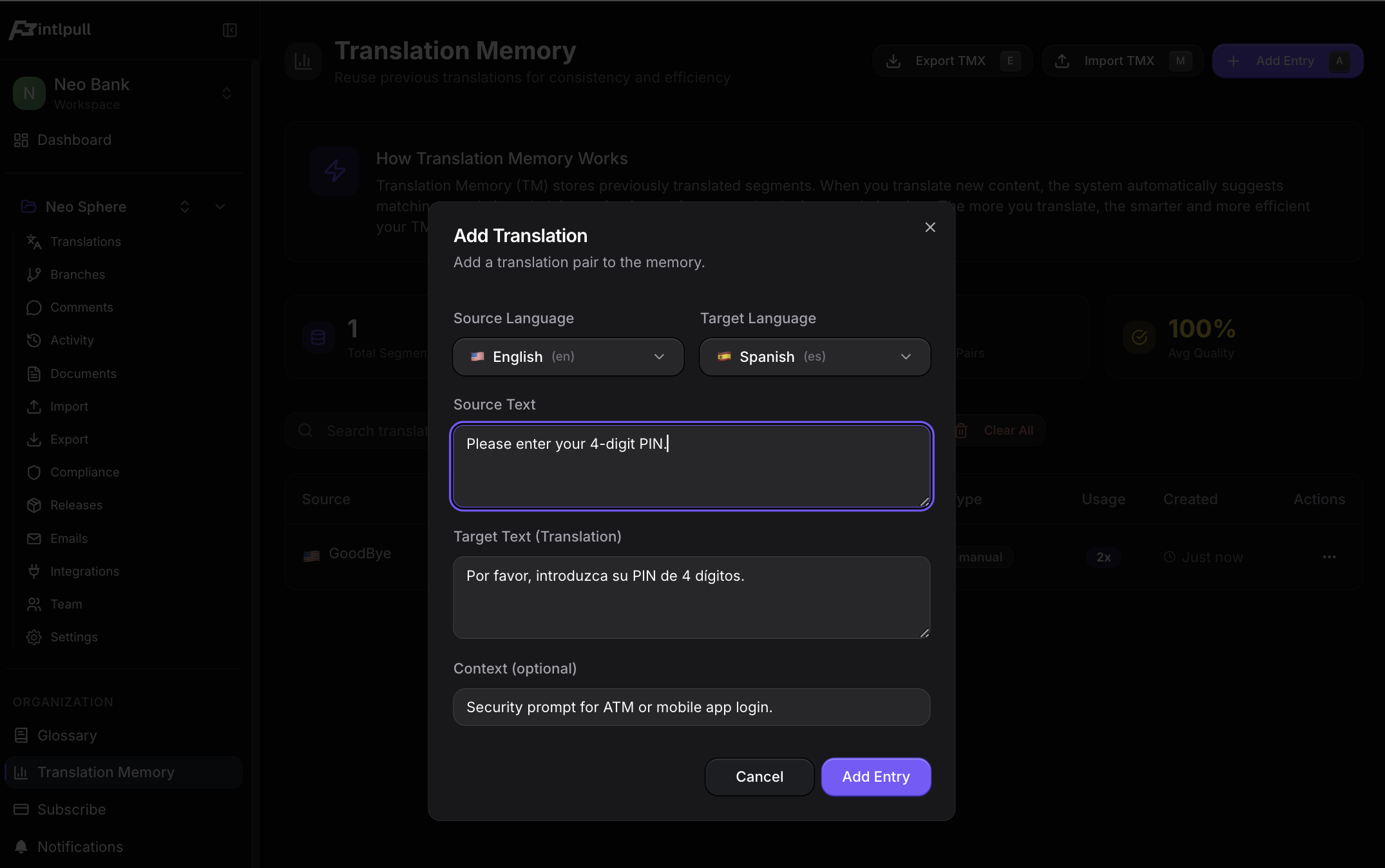
100% Matches (Exact)Exact
When a source text exactly matches a previously translated string, the TM surfaces a 100% match. Using keyboard-driven workflows, the user simply hits Ctrl+Enter to apply the exact translation.

Fuzzy MatchesFuzzy
What happens when you update "4-digit PIN" to "6-digit PIN"? The TM detects the structural similarity and flags it as an 87% fuzzy match, allowing the user to merely swap the "4" for a "6".

3. Context-Aware Editor Synergy
The true power of an optimized localization architecture is realized when TM and Glossary data are seamlessly injected directly into the workspace. If users have to switch tabs to consult an external termbase, cognitive load spikes and velocity plummets.
Inline Intelligence
When translating a string containing a protected glossary term (like "PIN"), the system actively highlights the term and provides a tooltip definition directly in the translation workspace.

Unified Context Panel
A centralized view of all metadata—the exact JSON key name (e.g. key_validation), team notes, activity history, and available TM/Glossary hits—keeps the user fully grounded in the reality of the application's design and code.

The Architectural Takeaway
Implementing Translation Memory and strict Terminology Management is about far more than just aiding translators. It is a fundamental optimization of the entire product design and development cycle.
By leveraging fuzzy matching, teams drastically reduce the cost of continuous localization—paying only for the delta of changed words. By enforcing glossaries early in the design phase, teams prevent UI layout breaks, ensure brand consistency, and eliminate costly linguistic QA cycles. With these tools embedded directly into the workflow, IntlPull transforms internationalization from a fragile bottleneck into an automated, high-velocity pipeline.